Antivirus Tales
  • Home
  • Contact Us
  • Knowledge base
  • Support
  • All Antivirus
  • Home
  • Contact Us
  • Knowledge base
  • Support
  • All Antivirus

Step 1

20%

Q1: Kindly choose your brand name.

Step 2

40%

Q2: Kindly choose your device.

Step 3

60%

Q3: Kindly fill your contact details.

Step 4

80%

Q4: Kindly fill your contact details.

Facing trouble with your Antivirus ? - Fix Now
How to Stop ESET Pop Up
  • Feb 15, 2025
  •  | 
  • By Drake shawn
  •  | 
  •  | 
  • Views: 1006

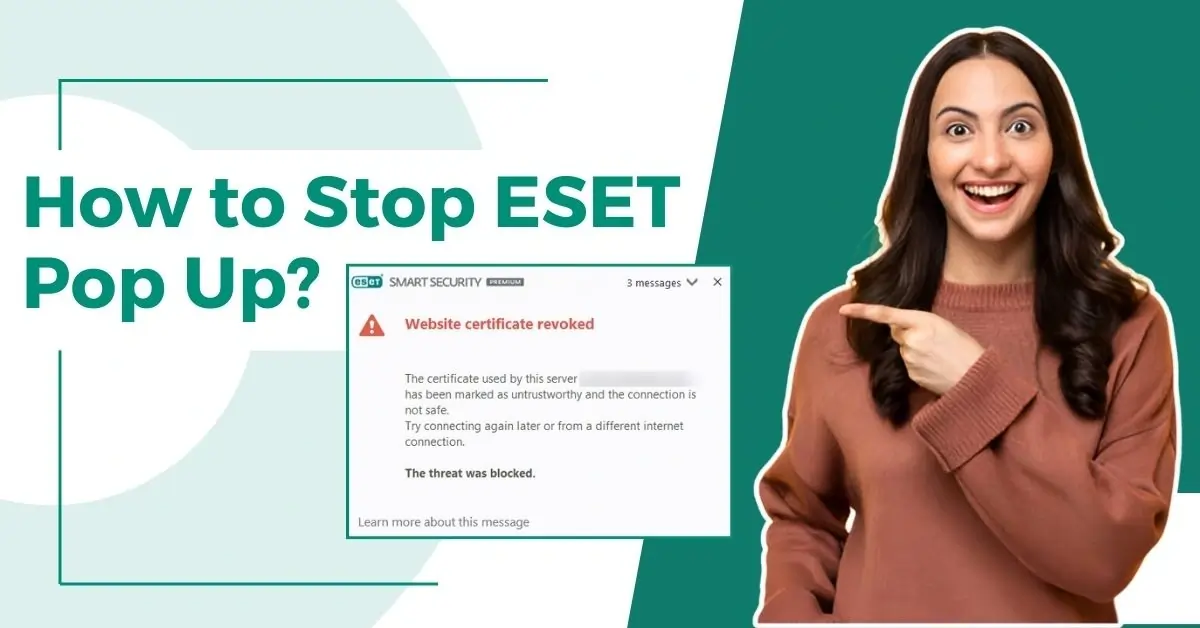
How to Stop ESET Pop Up?

Recurrent notifications from ESET may annoy users. These notifications can distract users or interrupt their daily workflow. If you are also experiencing similar issues and want to get rid of them, then this guide can help.

Frequent ESET pop-ups may cause your system to become sluggish. These pop-ups may hinder critical tasks or gaming sessions. Sometimes, these pop-ups can be unclear or difficult to understand, causing confusion or unnecessary worry. Live chat with experts

Here is a complete guide on how to stop ESET pop up. Address the issue and keep away all the potential distractions. Let’s delve deeper.

Potential Issues When Stopping ESET Pop Ups

When you try to stop the ESET pop ups, you may encounter the following issues, which may hinder the overall process:

  • Loss of functionality

  • System performance issues

  • Legal and compliance risks

The Procedure to Stop ESET Pop Up Notifications 

Stopping ESET pop up notifications is a simple task. Here are the steps to stop ESET pop ups: 

Step 1: Open the ESET antivirus program.
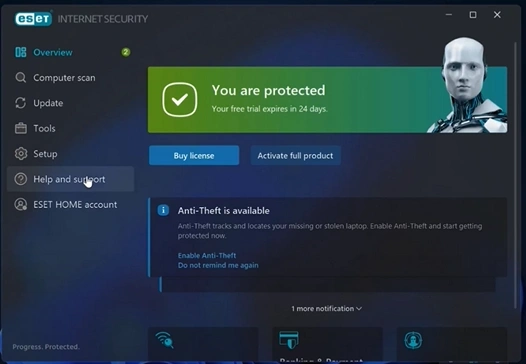
Open the ESET antivirus program

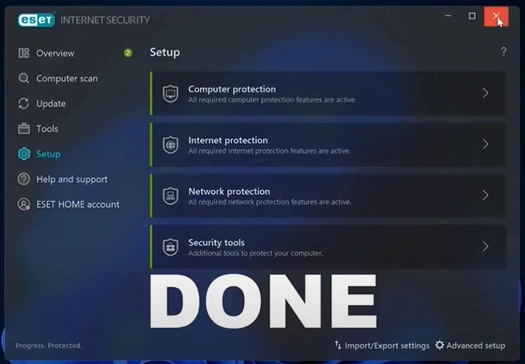
Step 2: Click Setup in the left panel, then click Advanced Setup in the bottom right side of the screen.  

click Advanced Setup in the bottom right side of the screen

Step 3: Select Notifications, go to the Application Statuses section, and click Edit.
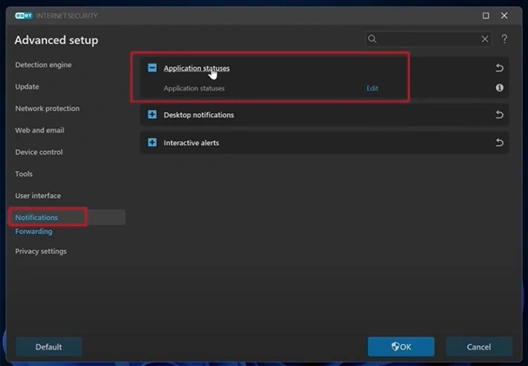
go to the Application Statuses section, and click Edit Live chat with experts

Also Read:- How to Uninstall/Remove ESET Antivirus Windows 11/10?

Step 4: Click the + icon next to Licensing to expand.
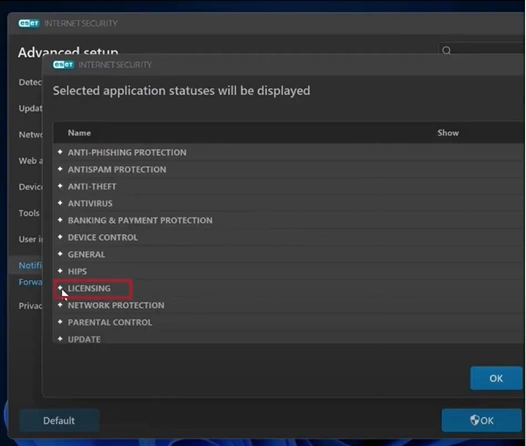
icon next to Licensing to expand

Step 5: Uncheck the options you do not want to receive notifications and click OK.
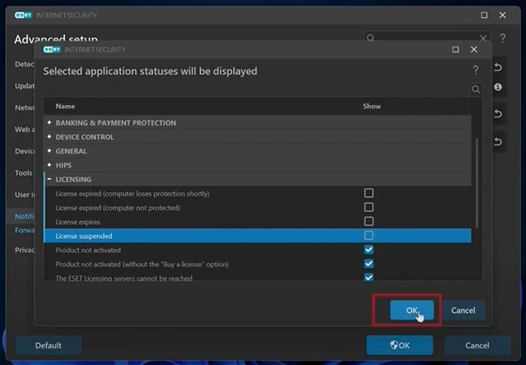
receive notifications and click OK

Step 6: Click Desktop Notifications to expand.

Click Desktop Notifications to expand

Step 7: Toggle off Display Desktop Notifications, then click OK to save the changes.
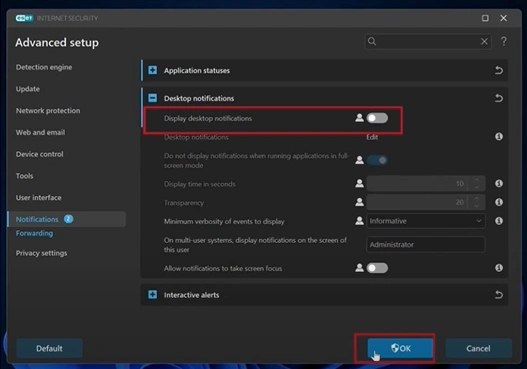
Toggle off Display Desktop Notifications

Step 8: Close the program.

Close the program

To Sum Up

Here we conclude this detailed guide on how to stop ESET pop up. Certain ESET pop-ups contain marketing messages that may be risky if clicked. So, prioritize your privacy and disable these pop-ups. Turn off the unwanted notifications, enjoy better focus, and increase productivity.

If you encounter difficulty stopping ESET pop up notifications even after following the above steps, connect with an expert. 

Was this article helpful?
Antivirus Support
Tags: How to Stop ESET Pop Up
  • Share
Prev
How to Add Another Device to Avast Account?
Next
How to Add Exceptions to Avast?

free consultation

Table of Contents

  • Potential Issues When Stopping ESET Pop Ups
  • The Procedure to Stop ESET Pop Up Notifications 
  • To Sum Up

Recent Post

About McAfee Corp

Learn All About McAfee Corp. [A Cybersecurity Company]

Feb 23, 2023
Kaspersky

Things You Need to Learn About Kaspersky Before Choosing It!

Feb 23, 2023
About AVG Technologies

All You Need to Know About AVG Technologies

Feb 23, 2023
Important Facts to Know About Norton

Important Facts to Know About Norton

Mar 27, 2023
Know About the Bitdefender Company

Everything You Need to Know About the Bitdefender

Mar 28, 2023
Antivirus Tales

An independent troubleshooting resource for antivirus software errors. Guides here cover installation failures, update issues, scan errors, product key problems, and more - across all major antivirus programs.

Not affiliated with any antivirus company.

Company

  • Home
  • Knowledge Base
  • Support
  • Contact Us

Issues We Resolve

  • Learn All About McAfee Corp. [A Cybersecurity Company]
  • Things You Need to Learn About Kaspersky Before Choosing It!
  • All You Need to Know About AVG Technologies
  • Important Facts to Know About Norton
  • Everything You Need to Know About the Bitdefender
  • Everything You Should Know About the Sophos

Contact Info

  • Email info@antivirustales.com
  • Contact US +1-857-557-6826
    UK +44-161-791-4591
  • Address 698 NE 1st Ave, Miami FL 33132

Copyright © 2026 by Antivirustales.com All rights reserved.

  • Terms Of Use
  • Disclaimer
  • Privacy Policy
image-not-found
1
2
3
4
5

Step 1

Let's start 😀

Which operating system do you use ?

Step 2

Step 2 to 5

Let us know the device you are facing this error/issue on:

Step 3

step 3 to 5

Let us know, since how long have you been facing this error/issue

Step 4

step 4 to 5

Kindly enter your name and email

Step 5

Last step 🏆

Let us schedule a call for you

Step 5

Completed 100% 🏆

Thankyou for contacting us

Our subject matter expert will contact you on the provided number, kindly answer all the calls.

Chat Support
🍪 We are using Cookies! For more information visit this page  Cookie policy.