
How to Disable Bitdefender Pop Ups?
It was a sunny Monday. I worked on my laptop for a while, doing my regular office work. But for a few days, I’ve been noticing small banners at the bottom of my screen. Those pop-ups were not from my web browser or any other app, but from Bitdefender.
At first, I overlooked most of the notifications. But while I was working on something important, I realized that the pop-ups were distracting me. It felt like a significant interruption. So, I used my tech expertise and turned off Bitdefender pop-up notifications.

Are those frequent pop-ups on your screen hindering your everyday tasks? I’ll show you the right method to quickly disable Bitdefender pop-ups. Let’s check out how I did it and how you can, too.
Potential Issues When Disabling Bitdefender Pop Ups
Before you learn how to turn off Bitdefender pop-ups, here are a few potential problems you may encounter on your computer:
-
Trouble identifying actions taken
-
Lack of real-time protection feedback
-
Update notifications disabled
-
Difficulty troubleshooting issues
Steps to Disable Bitdefender Pop Ups
Bitdefender is powerful antivirus software offering steady protection against malware and viruses. However, those frequent pop-up notifications may sometimes disrupt daily workflow or gaming sessions. Let us look at the steps you need to follow to turn off Bitdefender pop-ups:
Step 1: Launch your Bitdefender antivirus.

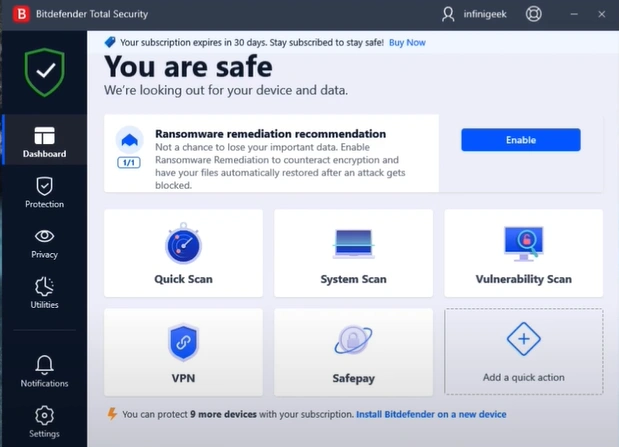
Step 2: Click on the Settings tab.
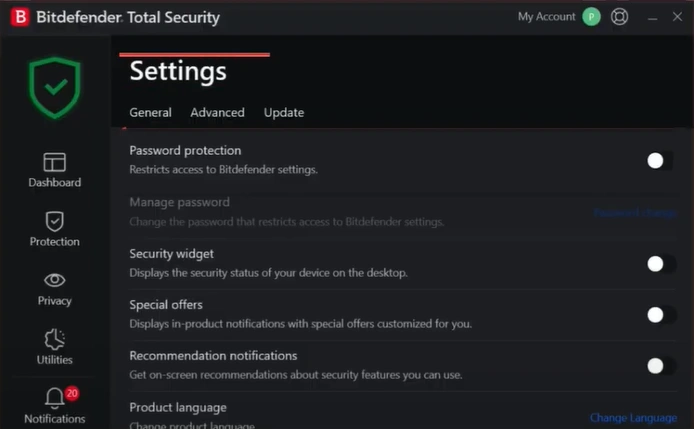
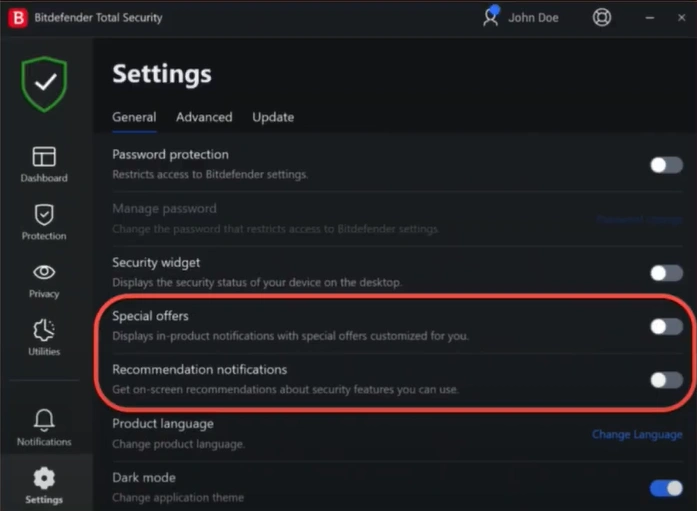
Step 3: Turn off the Special Offers and Recommend Notifications option in the General tab.
Also Read:- How to Cancel a Bitdefender Subscription?
In a Nutshell
No more facing distractions because of those unnecessary pop-up notifications on your screen; just enjoy smoother operations. Follow the steps above carefully. You can easily regain control over your computer screen by quickly fine-tuning Bitdefender settings.
Disabling pop-ups may lead to challenges such as identifying actions taken, missing real-time protection feedback, or not receiving update notifications. So, tackle them smartly to ensure a hassle-free process.

