
How to Turn Off Bitdefender Safepay?
One day, while working on a freelance project, I encountered an issue with Bitdefender Safepay. When I opened my web browser, a pop-up interrupted me—Bitdefender Safepay had launched automatically.
Initially, I appreciated the added security provided by Bitdefender Safepay. However, over time, it became frustrating as it blocked access to certain banking and shopping websites. Additionally, it slowed down my system and disrupted my workflow. I wanted more control over my browsing experience.

After turning off Bitdefender Safepay, I experienced a smoother workflow and a faster-running system, allowing me to complete all my projects on time. If you also want to disable Bitdefender Safepay, follow the steps I've outlined. But first, let’s look at the potential issues you may face when turning off Bitdefender Safepay.
Potential Issues When Disabling Bitdefender Safepay
You may face numerous potential issues when trying to turn off Bitdefender Safepay on your system. These can be:
-
Difficulty disabling Safepay
-
Persistent notifications
-
Profile settings overriding
-
Workaround limitations
-
Bookmark issues
Steps to Turn Off Bitdefender Safepay
It may seem simple to disable Bitdefender Safepay; you have to follow these essential steps:
Step 1: Launch your Bitdefender antivirus application.

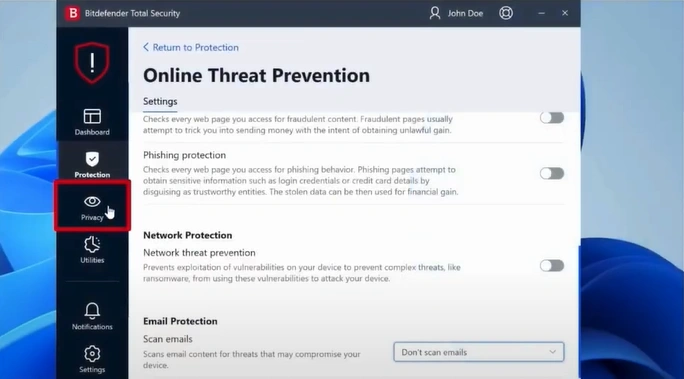
Step 2: Open the Privacy tab from the left panel.
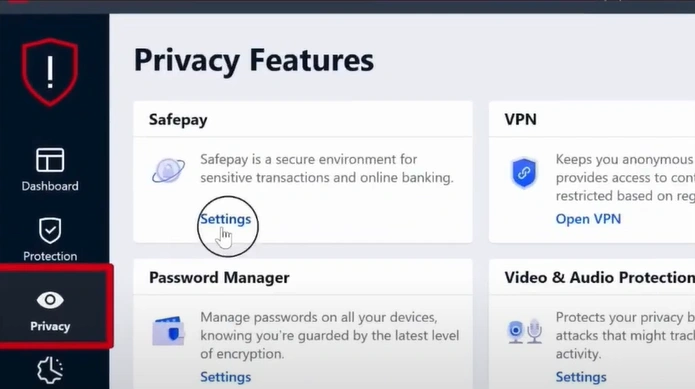
Step 3: Go to the Safepay section and click on Settings.
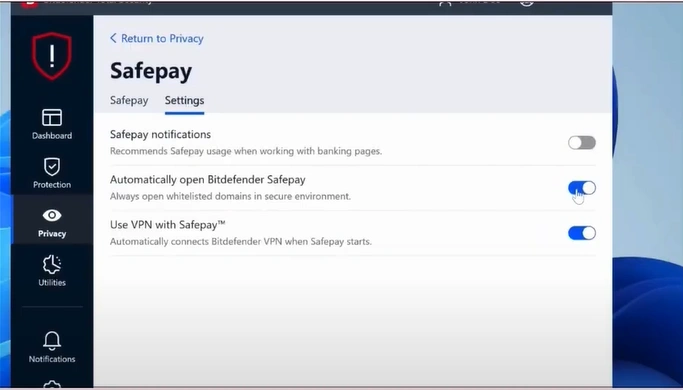
Step 4: Click the Settings tab and toggle off all the Safepay features.
Also Read:- How to Disable Bitdefender Pop Ups?
Wrapping Up
Eliminate the frustration caused by your security software. Try the steps mentioned above to turn off Bitdefender Safepay successfully. Get full control over your browsing and explore more without facing any unnecessary notification pop-ups. Address challenges such as recurring notifications, default settings reactivating Safepay, or disruptions to saved bookmarks.

